Writing templates
A template describes what a workspace runs. It is a short YAML document in the IDEKube template language, written in one of your teams and reviewed before anyone can run it.
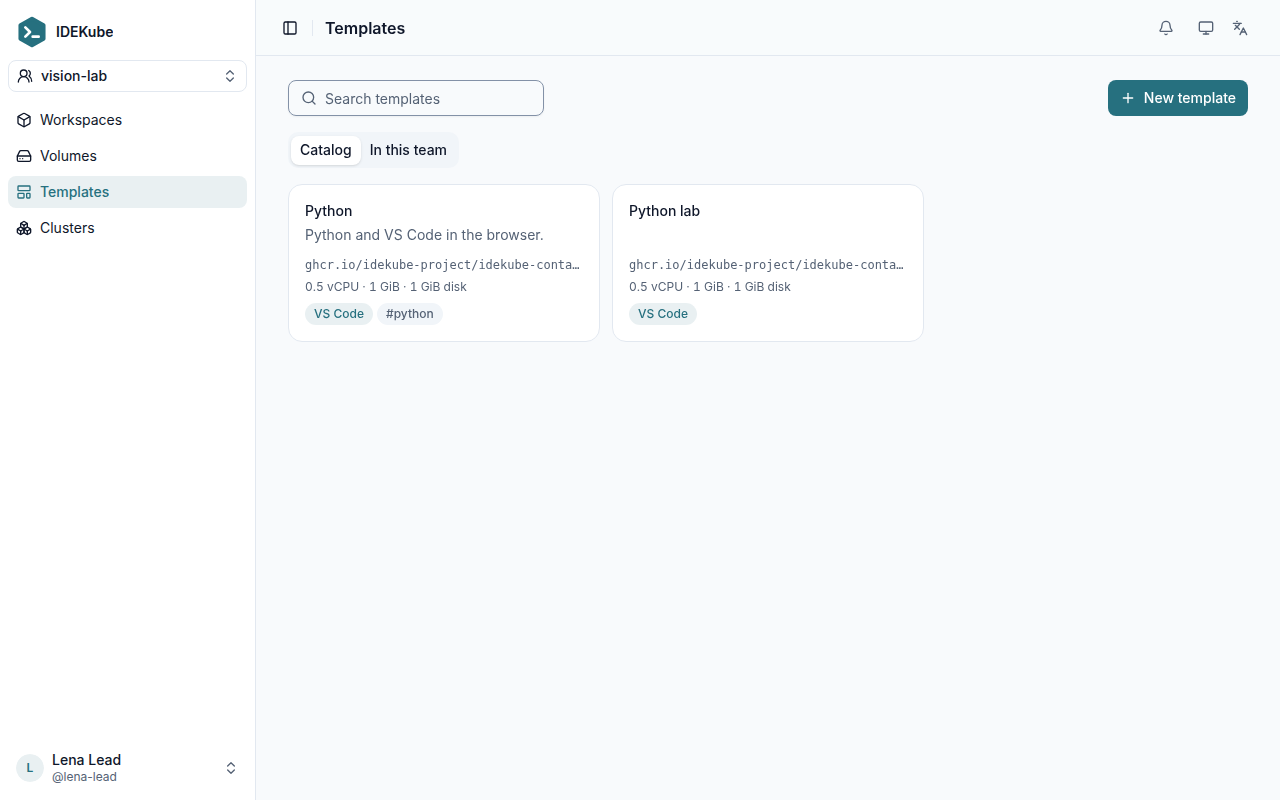
The Templates page lists under Catalog the templates you may create workspaces from, and under In this team those of the team chosen in the sidebar, drafts included.
name: VS Code
description: VS Code with Miniconda in the browser.
tags: [vscode, python]
image: ghcr.io/idekube-project/idekube-container-coder:conda-v0.8.3

resources:
  cpu: 2
  memory: 4Gi
  storage: 10Gi

endpoints:
  - name: VS Code
    path: /coder/
  - name: SSH
    path: /ssh
    protocol: ssh
The editor on the Templates page starts from examples for every image of the idekube-container family, checks the document as you type and points at the line of every problem.
Global templates
A template of no team is global, the platform's own: everyone may create workspaces from it once it publishes a revision, and only those who hold template:manage change it. They create one by turning on Global template in the editor, or "global": true in POST /v1/templates. Those who hold both template:manage and team:manage see every template on the Templates page and Move one to another team or make it global (POST /v1/templates/{id}/move with team_id, or null). Workspaces made from a template that moves are left as they are and keep starting from it.
From draft to published
- Write a draft. Creating a template, or editing one, saves a draft revision. A draft can be saved as often as you like, but only without errors; warnings are fine.
- Submit it. A submitted revision never changes again, so a reviewer approves exactly what they read. To change it, withdraw it; your next edit starts a new draft.
- Wait for a review. Someone with
template:reviewapproves it, which publishes it, or rejects it with a note. Reviewers see the difference to the published revision.
Workspaces are only ever created from the published revision. Publishing a new revision does not disturb running workspaces: a workspace picks up what its template publishes the next time it starts, unless its people turned Take new revisions of its template off in its settings. The revision a workspace runs is shown on its page, and so is a newer one.
Those who may change a template may require its published revision on every workspace made from it, from the template's menu: each takes it at its next start, whatever its people chose, or at once with Require now, restarting them (POST /v1/templates/{id}/require). Their creators are told; each is audited as workspace.require_revision. Deleting a template asks how many workspaces were made from it: they keep their own copy and go on starting, but take no new revision. Disabling it keeps it for them instead.
Who may do what:
| Write and submit | Members of the template's team who hold template:author (every account does). A member changes the templates they created; team admins change them all. |
| See drafts and history | Members of the template's team, and holders of template:read or template:review. |
| Approve or reject | Holders of template:review, who approve only what others wrote; holders of template:manage approve their own too. |
| Use | Members of the template's team; everyone once a reviewer shares the template with everyone. |
The language
A template is a YAML mapping (JSON works too, it is YAML). Fields not listed here are kept and ignored, so a template written for a plugin or a newer release still loads; the editor warns about them in case of a typo. Fields whose name starts with x- are yours and never warned about.
| Field | Default | Meaning |
|---|---|---|
version | 1 | Version of the language. |
name | required | Shown in the catalog. |
description | Shown in the catalog. | |
tags | [] | Up to 16 words to find the template by. |
image | required | Container image, e.g. ghcr.io/org/image:tag. |
command, args | image's | Override the image's entry point and its arguments. The editor warns about command: without the image's own startup script, the workspace gets no variables, live SSH keys or tasks. |
env | {} | Environment variables, name to string value. |
port | 80 | The single HTTP port the image serves on. |
home | /home/idekube | Where the workspace's home volume is mounted. "" gives workspaces no home volume. |
health | /health | Path that answers 200 once the workspace is ready. "" waits for the port to accept connections instead, for images without such a path. |
runtime | cluster default | A runtime the administrator offers, e.g. kata for stronger isolation. |
networks | [] | Secondary networks the administrator offers, attached through Multus. Reserved: not yet tested with Multus. |
resources.cpu | 2 | Default CPU limit: cores, or millicores such as 500m. At least 100m. |
resources.memory | 4Gi | Default memory limit, at least 128Mi. |
resources.storage | 10Gi | Default size of the home volume. |
resources.shm | runtime's (64 MiB) | Size of /dev/shm. It is memory and counts against the memory limit. |
resources.accelerator.class | A device class the administrator offers, e.g. nvidia. Without an accelerator, workspaces of the template have no GPUs or NPUs unless they ask, of any class their worker offers. | |
resources.accelerator.classes | [class] | Classes users may choose from instead, e.g. [t4, a100]; class, when given, is one of them and the default, else the first is. |
resources.accelerator.count | 1 | Default number of devices; 0 makes them optional. |
endpoints | [] | Paths of the workspace worth opening directly, see below. |
tasks | [] | Shell commands the workspace runs when it starts, see below. |
Sizes are Kubernetes quantities: 512Mi, 4Gi, 1.5Gi, or 10G for powers of ten. A number without a unit counts bytes, so write memory: 4Gi, not memory: 4096.
Users may change CPU, memory, devices and the home volume size when they create a workspace, within their quota; the template only sets the defaults.
The platform adds IDEKUBE_WORKSPACE_ID and IDEKUBE_USER to the environment of every workspace.
Endpoints
An image of the idekube-container family serves everything on port 80 under a path per service. Endpoints list them, so that the workspace page offers each one:
endpoints:
  - name: Desktop
    path: /vnc/
  - name: VS Code
    path: /coder/
  - name: SSH
    path: /ssh
    protocol: ssh
| Field | Meaning |
|---|---|
name | Shown on the workspace page; unique within the template. |
path | Absolute URL path; unique within the template. |
protocol | http (default), or ssh for a WebSocket tunnel to the SSH server. At most one. |
public | Serve the path without the platform's sign-in. The image must protect it itself. |
An ssh endpoint is always served without the platform's sign-in: SSH authenticates with keys. The workspace accepts the SSH keys of its creator, as long as they are a member of its team. A key added or removed on the profile counts within seconds, without a restart. See Workspaces.
Tasks
Tasks run when a workspace starts, as its user, in the home directory, with the user's variables, each in the background while the editor is already usable:
tasks:
  - name: deps                       # lower-case letters, digits and dashes
    init: pip install -r requirements.txt
  - name: notebook
    command: jupyter lab --port 8888 --no-browser
initruns once per home volume: the first start, and again only on a new home. A task whoseinitfails stops there.commandruns at every start, afterinit.- A task has an
init, acommandor both; at most 16 tasks, with distinct names.
Each task's output is kept in /run/idekube-tasks/<name>.log, and its exit status, once it ends, in <name>.exit; the workspace's panel shows both. Tasks need an image of the idekube-container family, whose startup runs the platform's hook.
Fields of plugins
Plugins that are on may add top-level fields, checked like the others while the plugin is on and kept but ignored while it is off; the editor lists them. For example, the Git plugin reads git:, the repositories every workspace clones. A field whose name starts with x- is left alone by the platform and its plugins alike.
Accelerators
resources:
  cpu: 8
  memory: 32Gi
  shm: 8Gi
  accelerator:
    class: nvidia
    count: 1
The administrator defines the device classes, one per kind of device: which Kubernetes resource they are requested under, which nodes have them and which runtime they need. Classes are also price tiers. The editor lists the classes and runtimes on offer.
To let users pick a tier, list the classes:
resources:
  accelerator:
    classes: [t4, a100]   # T4 by default, A100 for those who need it
    count: 1
A workspace chooses a class and a count; users with a gpu quota may change both later.
Through the API
# Check a document without saving it.
curl -H "Authorization: Bearer $TOKEN" -X POST $API/v1/template-language/check \
  -d "$(jq -n --rawfile source vscode.yaml '{source: $source}')"

# Create it in your personal team (or pass team_id), then submit revision 1.
curl ... -X POST $API/v1/templates -d "$(jq -n --rawfile source vscode.yaml '{source: $source}')"
curl ... -X POST $API/v1/templates/$ID/revisions/1/submit
PUT /v1/templates/{id}/draft saves the next draft; GET /v1/template-language lists the device classes, runtimes and examples.