Workers
A worker is where workspaces run: a Kubernetes cluster, or a namespace of one, with an agent installed in it. The agent dials the control plane and keeps a WebSocket open to it, so a worker may sit in another network, behind a firewall or NAT, as long as it reaches the control plane's URL. How it works is described in Workers, agents and the link.
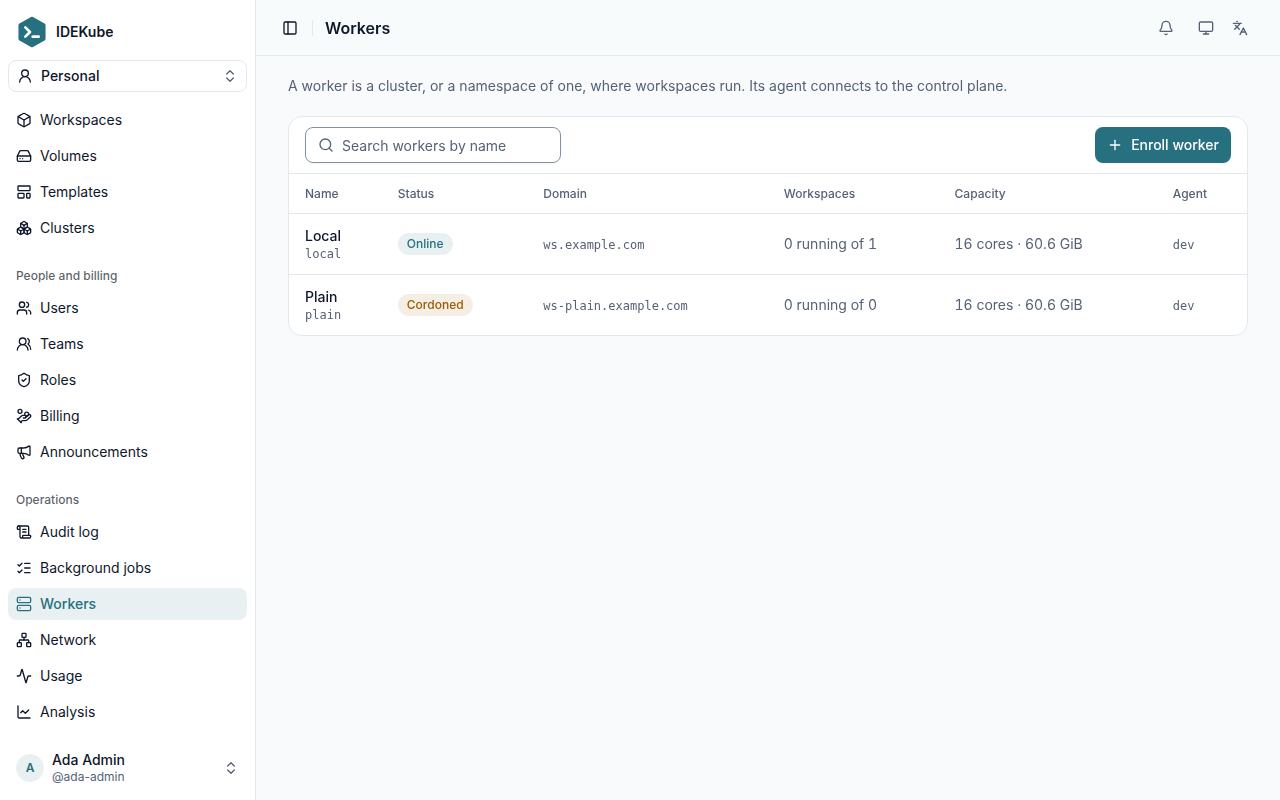
The platform's chart installs one worker in its own cluster, named local. The Workers page, under Operations, lists every worker: whether its agents are connected, the domain its workspaces are served on, how many run there, and what its nodes can hold.
Enroll a worker
-
On the Workers page, choose Enroll worker and give it a name, for example
gpu-lab. -
The page shows the worker's token once, with both a
helm installcommand and a standalone kubectl YAML manifest (kubectl apply -f ...). Run either against the worker's cluster, with the wildcard domain its workspaces will be served on:helm install gpu-lab oci://ghcr.io/idekube-project/charts/idekube-worker \--namespace idekube-gpu-lab --create-namespace \--set controlPlane.url=https://idekube.example.org \--set token=idkw_... \--set workspaces.domain=ws.gpu-lab.example.org -
The worker shows as online within seconds.
-
Add its workspace domain to the platform chart's
frontend.connectSources, for examplehttps://*.ws.gpu-lab.example.org, so that the platform's pages may show its workspaces' files and tasks. Serve workers over HTTPS: browsers warn before opening a workspace served over plain HTTP, and do not let a platform served over HTTPS show its files and tasks.
The worker's cluster must run Kubernetes 1.29 or later: every workspace runs a native sidecar container.
The worker serves its workspaces with its own gateway, an Envoy next to the agent (see Workspace access). Point a wildcard DNS record for its domain at one of:
- the cluster's ingress controller, with
--set gateway.ingress.enabled=true; it terminates TLS withworkspaces.tlsSecretand routes to the gateway; - the gateway's Service, with
--set gateway.service.type=LoadBalancer(orNodePort); the gateway terminates TLS itself withworkspaces.tlsSecret, and reloads the certificate when the secret is renewed.
The worker needs no route from the control plane to it: authorization, like everything else, travels over the agent's link.
Values of the worker chart
| Value | Default | Meaning |
|---|---|---|
controlPlane.url | required | Where the agent reaches the control plane. |
controlPlane.caBundle | "" | PEM bundle to trust, for a control plane whose certificate comes from a private CA: only its certificates are then trusted. |
controlPlane.insecure | false | Allows an http:// URL, which sends the token in the clear; only for a control plane reached inside the cluster. The agent refuses plain http otherwise. |
token or existingSecret | required | The worker's token, or a Secret holding it under the key token. |
workspaces.namespace | <release>-workspaces | Namespace workspaces run in, apart from the agent; created by the chart unless it is the release namespace. The agent may change objects there only. |
workspaces.domain | "" | Workspaces are served on <id>.<domain>. Empty leaves them unreachable. |
workspaces.scheme | https | Scheme of workspace URLs. |
workspaces.tlsSecret | "" | Secret with a certificate for *.<domain>, in the release namespace. |
gateway.ingress.enabled, .className, .annotations | false, nginx, timeouts and body size for ingress-nginx | Route the domain to the gateway through an ingress controller. |
gateway.service.type | ClusterIP | LoadBalancer or NodePort to reach the gateway directly. |
gateway.trustedHops | the ingress controller, if any | Proxies in front of the gateway that append to X-Forwarded-For. |
gateway.maxConnections | 50000 | Connections the gateway accepts at once. |
agent.replicas | 2 | See Agents. |
agent.usage | true | Tell what workspaces, volumes and nodes use, read from the kubelets with nodes/proxy (get); see Resource metrics. |
global.imageRegistry | "" | Registry of the agent and Envoy images, for air-gapped clusters. |
Two workers cannot serve the same domain: the second agent is refused until its domain is changed.
Settings of a worker
A worker runs workspaces with the worker settings: device classes, runtimes, volume classes, networks, registry mirrors, pull policy and secrets, overcommit and node selector. On a worker's page, Settings overrides any of these fields for that worker alone; a field left empty inherits the defaults. A workspace starts only where what running workspaces request, their limits divided by the overcommit, leaves room for it; the worker's page shows the limits allocated against its capacity times the overcommit. A device class or volume class is offered by the platform when any active worker offers it, and a workspace that asks for it is placed on a worker that does.
Changes reach the agents within seconds.
Placement
A new workspace or volume is placed on a worker:
- A workspace that mounts existing volumes goes to their worker. Volumes on different workers cannot be mounted together, and a volume of another worker cannot be attached later: a workspace and its volumes always share a worker.
- A user may choose the worker when there are several. A cordoned worker cannot be chosen, and one that does not offer what the workspace or volume asks for is refused.
- Otherwise the candidates are the active workers that offer what the workspace asks for (its device class, runtime, networks and volume class) and, for devices, still have enough of them free according to what their nodes report.
- An online worker is preferred to one that is not. Among those left, the one with the least CPU of running workspaces relative to its nodes' CPU and its weight is chosen; volumes go to the worker with the fewest volumes relative to its weight.
A workspace is refused on a worker none of whose nodes can hold it, or that has fewer accelerators of its class than it asks, as the worker's nodes last reported; an inventory not reported for 30 minutes is not held against it. Several workspaces that go at once, such as a cluster's nodes, must also fit together besides what runs there.
Placement spreads load; it reserves nothing. Two workspaces created at the same moment may both land on the last free device, and the cluster's scheduler then keeps one pending until the device is free.
A worker is cordoned from its page: it keeps what it has, its workspaces still start and stop, but it takes nothing new. Moving a workspace and its volumes to another worker is not possible yet.
Users see every worker's title, whether it is online and whether it takes new workspaces, and the device and volume classes it offers (GET /v1/workers/locations); nothing else of it.
When a worker shrinks
When a worker's nodes no longer have room for what is meant to run there, e.g. once nodes were taken out or a class of accelerators is gone, its page says what it lacks and those who hold worker:manage are told, once each time it comes to lack something. Workspaces that do not get their room stay starting, saying what the scheduler waits for, until the start timeout (workspaces.start_timeout_s, 15 minutes by default) stops them and frees their quota; their creators are told why.
When a worker is offline
A worker none of whose agents was heard from for 90 seconds is offline. Nothing of it can be changed in its cluster until it is back: a workspace stopped meanwhile keeps running there, and stops once the agent reconnects. After five minutes, its running workspaces are shown as unreachable and their compute is no longer charged; they keep their quota.
Agents
An agent is stateless: everything it does is level-triggered against the control plane's database and its cluster's objects. Several agents may run for one worker, each with its gateway and connected to whichever control-plane replica the load balancer picks; two, the default, keep the worker's workspaces reachable while one restarts. A gateway keeps routing while its agent restarts, but cannot authorize new sessions until it is back.
Both agents apply commands and serve workspaces. One of them, elected with the Lease <release>-leader, leads: it alone reports the inventory, checks the network, configures sidecars, lets gangs start, removes orphans and upgrades the agents. The agents ask each other over their headless Service whether they have a link to the control plane:
- An agent that has had no link for 20 seconds while another one has one hands the lease back and is not ready, so that its gateway is taken out of the worker's Service until it links again. When no agent has a link, e.g. while the control plane restarts, they all go on serving what was already allowed, and one leads.
- A new agent is ready once it linked. A rollout of agents the control plane refuses, e.g. of a protocol it does not speak, therefore stops at the first one, and the agents that work are kept.
- An agent told to stop hands the lease back at once, is no longer ready and tells the control plane, which sends its commands to the other agent; it goes on answering for what its Envoy still serves for 15 seconds (
IDEKUBE_DRAIN), then exits.
An agent checks whether its cluster enforces network policies when it starts and every hour, and the worker's page shows what it found; see Network. It needs no more than what the chart grants.
An agent removes objects labelled app.kubernetes.io/managed-by=idekube in its workspace namespace that the control plane does not know for this worker — both workspaces and volume claims — once they have been orphans for ten minutes over two snapshots. Orphan workspaces are deleted before orphan volume claims so pods terminate and PVC finalizers release cleanly. Nothing is ever removed while the worker is held in maintenance or draining.
Agents
A worker's page lists its agents, one per pod, those connected and those of the last hour: their release, whether they are connected and to which replica of the control plane, which one leads and which is leaving, whether they serve workspaces, when they last told all their cluster holds, and why one was refused, e.g. a protocol the control plane does not speak. An agent of another release than the control plane's is marked. Below come the lines its agents logged at INFO and above, the latest first: the control plane keeps each agent's last thousand lines of the last week, so that what happened in a worker's cluster can be read without going there.
Upgrades
Upgrade the control plane first, then the workers' agents: a control plane speaks the protocol of the previous release too, so that agents of that release keep working until they are upgraded. Workspaces are not restarted by either: a running workspace keeps the sidecar and settings it started with until its next start, and pre-upgrade pods without sidecar mTLS stay reachable until restarted. When upgrading the worker chart to a release with sidecar mTLS (sidecar.mtls.v1), the workspace-namespace Role gains secrets permissions so the agent can manage per-workspace ws-<id>-tls Secrets mounted into sidecars. Each worker runs two agents, and a new one starts before an old one stops, so that the worker's gateway serves throughout; sessions allowed in the last quarter of an hour go on while the control plane itself restarts.
A worker is upgraded with its chart (helm upgrade), or its agents follow the control plane on their own when the worker's setting agent.auto_upgrade is on: the leading agent rolls their Deployment out to the control plane's release, the image of their own tag by default, or agent.image. A rollout whose new agents do not become available within five minutes is rolled back, and its image is not tried again; the worker's page shows the agents' release. Their chart allows this with agent.selfUpgrade, on by default: the agents may then change the image of their own Deployment, and nothing else. Install a worker's chart in a namespace of its own, which holds nothing but the agents and their token. A worker installed with the platform never upgrades itself; it is upgraded with the platform. Tools such as Argo CD that hold the Deployment to the chart's values should leave its image alone, or the setting off.
Maintenance
A worker in maintenance is held as it is: its agents apply and remove nothing, its workspaces go on running and being reached, and running sidecars keep the configuration they have. Commands for it wait with worker_maintenance and nothing new is placed on it.
- By hand. Set the worker's state to
maintenancefrom its page, e.g. before restoring the control plane's database. - On a restored database. The installation has an id and an epoch that grows every minute while its database does. Each agent keeps the highest epoch it saw in its ConfigMap
<release>-memory; when the control plane tells it a lower one, its database went back, and the agent holds the cluster as it is. So does the control plane when a cluster holds resources of a later generation than their rows. Acting on stale rows could otherwise stop or remove what was created since the backup. - On a cluster made anew. An agent that starts with no ConfigMap and finds none of the volumes its worker held data in is in a new cluster, e.g. one reinstalled from scratch. The worker is held so that you can tell whether this is the cluster meant; resumed, each missing volume is marked lost.
A volume that was ready once holds data. When its claim is gone from its worker's cluster, the volume is lost rather than claimed again empty: the workspaces that mount it stop and do not start, and its creator and its team's owners are told. Restore the claim in the cluster, e.g. from a backup of the storage behind it, and the volume is found ready again at the next snapshot; or have it recreated empty, from the Volumes page, or delete it.
Drain is available on a worker's page while the worker is online and manually placed in maintenance (never while held for safety after a database rollback or wiped cluster). Starting a drain (POST /v1/workers/{id}/drain, audited as worker.drain) transitions the worker to draining: new placements and workspace starts remain blocked, every running workspace on the worker is stopped (workspace.worker_drain), and once workspaces stop, every ready volume on the worker is archived to object storage. When draining finishes (or fails, e.g. if object storage is not configured), the worker returns to maintenance with the drain result shown on its page.
Resume the worker from its page once its database is right: its agents take the database's state from then on, and the rows that differ from the cluster are reconciled. You can resume directly into active (the default, accepting new workspaces and volumes) or cordoned (POST /v1/workers/{id}/resume with {"state": "cordoned"}, releasing the maintenance hold so existing workspaces and volumes reconcile while new placements remain blocked). Both options are offered in the maintenance banner and by choosing Active or Cordoned in the scheduling state selector. A resume is told to the agents connected at the time; resume again for one that was not. Changing the state leaves maintenance only through a resume, and the resumed state is recorded in worker.resume audit logs. While a worker is held, access to its workspaces is still decided by the control plane's database: access revoked after a backup works again until it is revoked anew.
Installing an agent again
The objects an agent makes in its cluster carry its worker's id and the release of its chart. To install a worker's agent again over the same cluster, e.g. after its chart was uninstalled, install the chart with the same release name and that worker's token, rotated on its page if it was lost: the agent finds its workspaces and volumes as they are and takes them over without applying anything again, even when it no longer has its ConfigMap.
Each workspace namespace belongs to one worker. If a worker is removed without draining and the same cluster/namespace is enrolled again as a new worker, the new worker's leading agent sees the leftover app.kubernetes.io/managed-by=idekube workspaces and volume claims as orphans and cleans them up after the orphan grace period (never while held in maintenance). To instead take over an existing worker's resources, rotate that worker's token and install the chart with it under the same release name before removing it. A new worker cannot serve the domain of an earlier one while that earlier one is still enrolled.
Tokens and removal
- Rotate token on a worker's page issues a new token; the old one keeps working for an hour, the time to give the agents the new one: upgrade the worker's chart with it, or change the Secret, which the agent reads again at every connection. Its agents are disconnected when the hour ends. Revoke a token that leaked instead: its agents are disconnected within seconds. The local worker's token is the deployment's: rotate it by changing the release secret's
worker-tokenand redeploying. - Remove worker forgets a worker that has no workspaces and no volumes, including ones it is still removing. To forget a worker whose cluster is gone, check Also forget its workspaces and volumes: each is forgotten as below, and nothing is removed from the cluster. Uninstall its chart yourself.
- Waiting to be removed, on a worker's page, lists its workspaces and volumes that were deleted and wait for its cluster to remove what they hold; so does an account or a team deleted with them, which the Users page shows under the status Deleting. Once the worker has been silent for five minutes, Forget one to remove it from the control plane alone. Each is audited as
workspace.forgetorvolume.forget, and the volumes only a forgotten workspace mounted wait in turn.
The worker permissions are worker:read, held by operators, monitors and administrators, and worker:manage, held by administrators.